A privacy policy is a legal requirement for any business or website, but where should you actually put it? To comply with international laws including GDPR, CalOPPA, and the Australian Privacy Act 1988, your privacy policy needs to be in a prominent, easily located place on your website. Let’s look at your options.
Privacy Policies and International Privacy Laws

A number of international privacy laws require not just that you have a privacy policy, but that it’s made easily available to your users and customers.
CalOPPA
The California Online Privacy Protection Act’s own guidance on making privacy practices public recommends:
“Use a conspicuous link on your homepage containing the word ‘privacy.’ Make the link conspicuous by using larger type than the surrounding text, contrasting color or symbols that call attention to it. Put a conspicuous ‘privacy’ link on every web page where personal information is collected. Format the policy so that it can be printed as a separate document.”
GDPR
The GDPR requires your privacy policy to be accessible from all pages. As gdpr.eu’s own guidance puts it:
“Generally, a privacy notice will be provided in writing and, where appropriate, supplied electronically. Every organization that maintains a website should publish their privacy notice there, under the title ‘Privacy Policy,’ and it should be accessible via a direct link from every webpage. If a website collects any personal data online, the privacy notice or a link to it should be provided on the same page where the data collection occurs.”
Australian Privacy Act 1988
The Act’s first Privacy Principle states that an entity must have a clearly expressed, up-to-date privacy policy about how it manages personal information, and must take reasonable steps to make it available free of charge and in an appropriate form, usually on its website.
Where to Display Your Privacy Policy
To comply with the laws above, your privacy policy needs to be placed prominently on your website, and on any page where you collect personal data.
Header Menu
The clearest, most prominent placement is your header menu. We place our own privacy policy alongside our terms and conditions and feedback page in our header menu, available from any page, and easy for users to find. Just make sure it’s clearly labelled “Privacy Policy” so there’s no confusion.
 Our Privacy Policy in top navigation
Footer
The footer is the most popular place websites put their privacy policy, and it’s available from any page too, an important requirement under most of these laws.
 Freepik Privacy Policy in the Footer
About Us
Another common option is under the “About Us” section of your main menu, convenient, and still accessible from any page.
Checkout Forms
A reliable way to make sure users see your privacy policy is to add it to your checkout form: typically a checkbox next to a statement like “I have read and agreed to the Privacy Policy of this website,” placed near the payment button, with the transaction blocked until it’s checked. Some sites instead treat completing a purchase itself as agreement to the privacy policy, linked clearly at checkout. Either way, it’s important customers are aware of what personal information you’re collecting before they hand it over, and it gives you a clear record that they were informed.
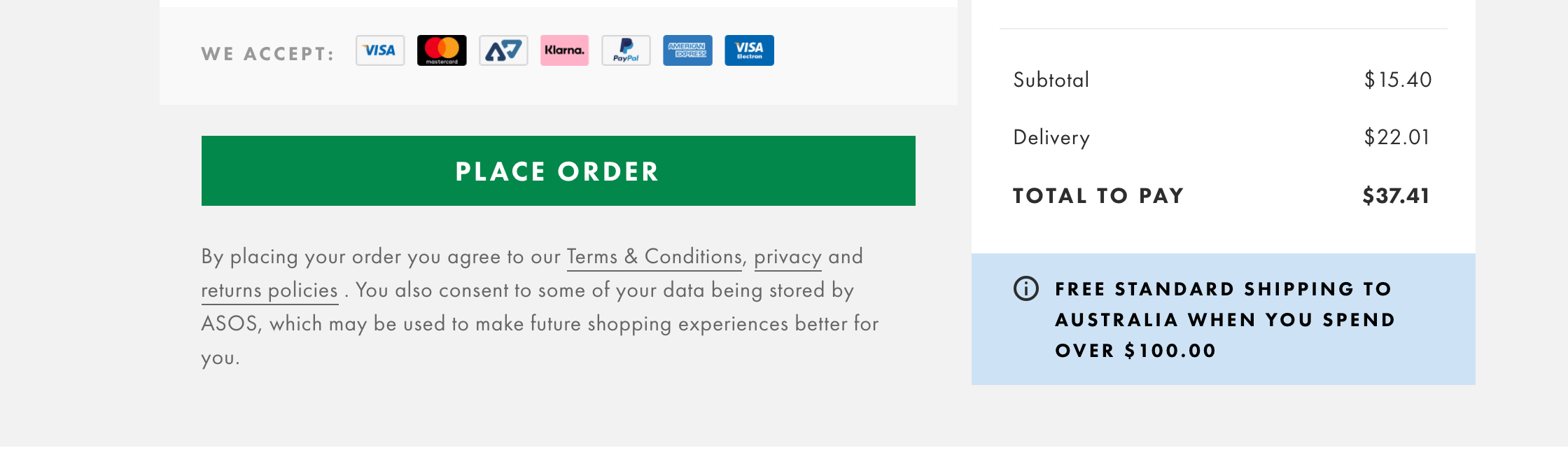 ASOS privacy policy is linked at checkout.

Conclusion
There’s a common theme across privacy laws: you need a conspicuous, easily accessible privacy policy on your website, placed on any page where you collect personal information. The most common places are:
- Header menu
- Footer
- About Us
- Checkout forms
The information in this article is for informational purposes only and should not be construed as legal advice on any matter, and does not create a lawyer-client relationship.